



.png)
Welcome to the first post in our Snowflake Concepts series, where we break down powerful Snowflake features that solve real data engineering challenges.
And if you don't have an external orchestration tool in place, you're left using Snowflake's native features: Tasks and Streams, which require you to manually define execution order, handle errors, and manage dependencies yourself.
What if there was a simpler way? What if you could declare what your data should look like, and Snowflake automatically kept it up to date?
That's exactly what Dynamic Tables do.
In this post, we'll explore how Dynamic Tables work, when to use them, and how they can dramatically simplify your data pipelines. This is the first in a series where we'll cover Snowflake concepts like SCD Type 2 implementations, Tasks & Streams, and building production-grade pipelines.
Dynamic Tables are specialised tables that automatically refresh based on a defined query and freshness target. Instead of setting up tasks and schedules to update data, you simply define what the final table should look like. Snowflake handles the rest—managing refresh schedules, detecting changes, and updating your data automatically.
Think of them as materialised views with superpowers: they store query results for faster performance, but can handle complex transformations, joins across multiple tables, and intelligent incremental updates.
When you create a Dynamic Table, you write a SQL query that defines how data should be transformed. Snowflake then:
No orchestration tools. No complex DAGs. Just declare what you want, and Snowflake keeps it up to date.
Building data pipelines typically involves juggling many moving parts: extracting data from multiple sources, transforming it, managing dependencies, coordinating execution order, and handling failures when things inevitably break. Dynamic Tables cut through this complexity with three core benefits:
1. Simplified Pipelines
2. Reduced Development Time
3. Cost Effective
4. Native to Snowflake
Dynamic Tables operate on four key principles:
1. Define Your Query
Create the DT by writing a SQL query to transform the data you want
2. Automated Refresh
Snowflake runs this query on a schedule, automatically updating the Dynamic Table with any changes from the source tables
3. Efficient Updates
Instead of rebuilding the entire table, Snowflake detects changes and merges only new or modified data
4. Set Data Freshness (Lag)
You decide how up-to-date the data should be:
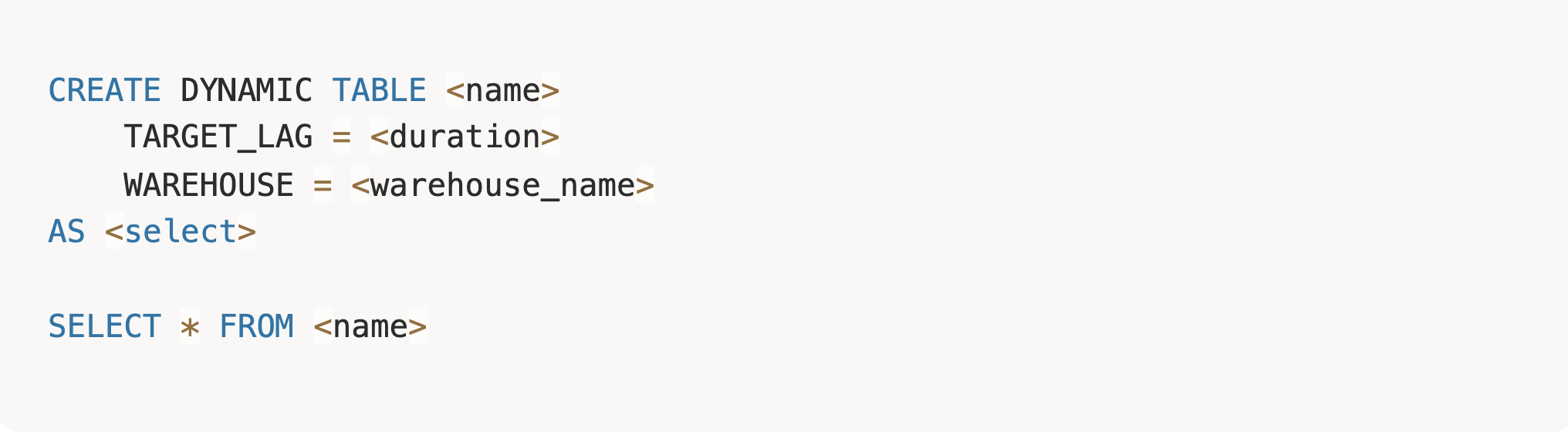
Dynamic Tables offer three refresh modes: auto
Uses an intelligent heuristic to select between full and incremental refresh based on query complexity: full
Creates a full refresh of the Dynamic Table, even if it can be incrementally refreshed: incremental
Creates an incremental refresh Dynamic Table. If the query doesn't support incremental refresh, creation fails.
Let's see how Dynamic Tables work with a real-world scenario. Imagine you're building user analytics for a SaaS product. You have clickstream data flowing in, and you need to track user engagement, daily activity, and conversion metrics.
Without Dynamic Tables, you'd need to:
With Dynamic Tables, you declare what you want, and Snowflake handles the rest.
First, let's create some sample data to work with:
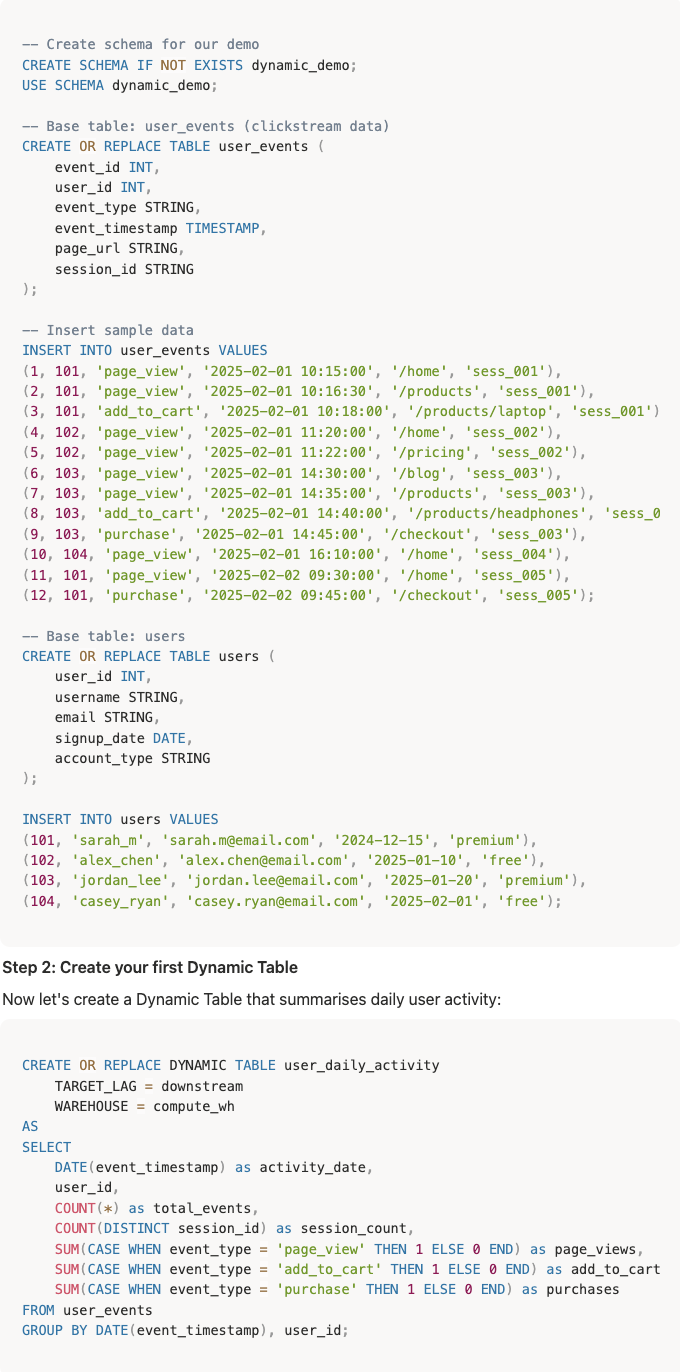
Now let's create a Dynamic Table that summarises daily user activity:

Finally, let's create a conversion funnel that depends on our daily activity table. Notice the TARGET_LAG = DOWNSTREAM parameter in the user_daily_activity dynamic table, this tells Snowflake to refresh that table automatically when this table daily_conversion_funnel needs an update. In summary, the user_daily_activity schedule is inferred from its downstream. Refer to this doc for more insight into target lag

That's it. No orchestration. No scheduling logic. Just define the transformation, and Snowflake keeps it updated within 5min minutes of any changes to user_events.
Now let's create a more complex Dynamic Table that joins user data with even


user_events before new data

user_daily_activity before new data

user_engagement_metrics before

daily_conversion_funnel before


user_events table after new record
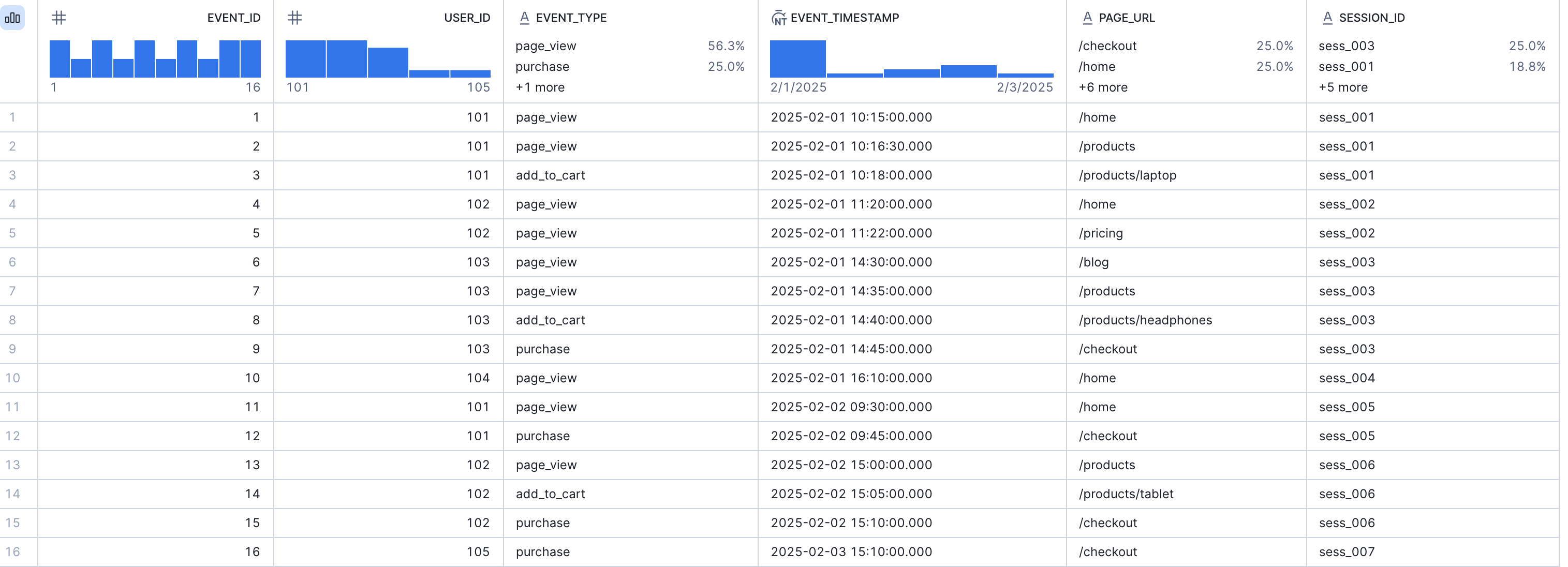
Wait for the target lag period to pass (or manually refresh), then query again. Below is the DAG from the graph view.

user_daily_activity after **new data (**user_id 105 automatically added after set target-lag)

user_engagement_metrics after

daily_conversion_funnel after

Your conversion funnel automatically reflects the new data—no DAGs to trigger, no manual refreshes, no orchestration debugging.
In less than 50 lines of SQL, we created:
✅ A three-tier data pipeline with proper dependencies
✅ Automatic incremental updates
✅ Multiple aggregation layers (daily activity → engagement → conversion)
✅ Cross-table joins without manual orchestration
With traditional orchestration, this would require:
Dynamic Tables handle all of this automatically.
Dynamic Tables are ideal for scenarios where:
Dynamic Tables may not be the best fit when you need:
Very complex multi-step logic may be better suited to Tasks/Streams
DT vs. Materialised Views
Materialised Views:
Dynamic Tables:
Streams and Tasks:
Dynamic Tables:
Target Lag is how you control data freshness in Dynamic Tables. The DT refresh is triggered by the data's set target_lag, which determines the latency of the data.
The parameter can either be:
This makes refresh timing depend on other Dynamic Tables that depend on it. If you have an upstream DT A and another downstream DT B that depends on it, table B would only refresh when DT A is updated.
Warehouses
Monitoring
Dynamic Tables are powerful for simple, declarative transformations, but what about more complex use cases, such as tracking historical changes? In the next post in this series, we'll explore implementing SCD Type 2 (Slowly Changing Dimensions) with Dynamic Tables—showing you how to maintain historical snapshots of your data without complex orchestration logic. Stay tuned, and in the meantime, try building your first Dynamic Table and see how it compares to your existing pipeline workflows.
Resources
