



Connecting an LLM to your warehouse takes an afternoon. Give it a SQL tool, point it at a database, ask "what was revenue last quarter?", and it will return a number with confidence.
The number is usually wrong in a way nobody notices, because it's close.
I ran the obvious-but-wrong queries against the Olist marketplace dataset used in this project. These are the queries a capable model writes when nobody has told it how the business works:
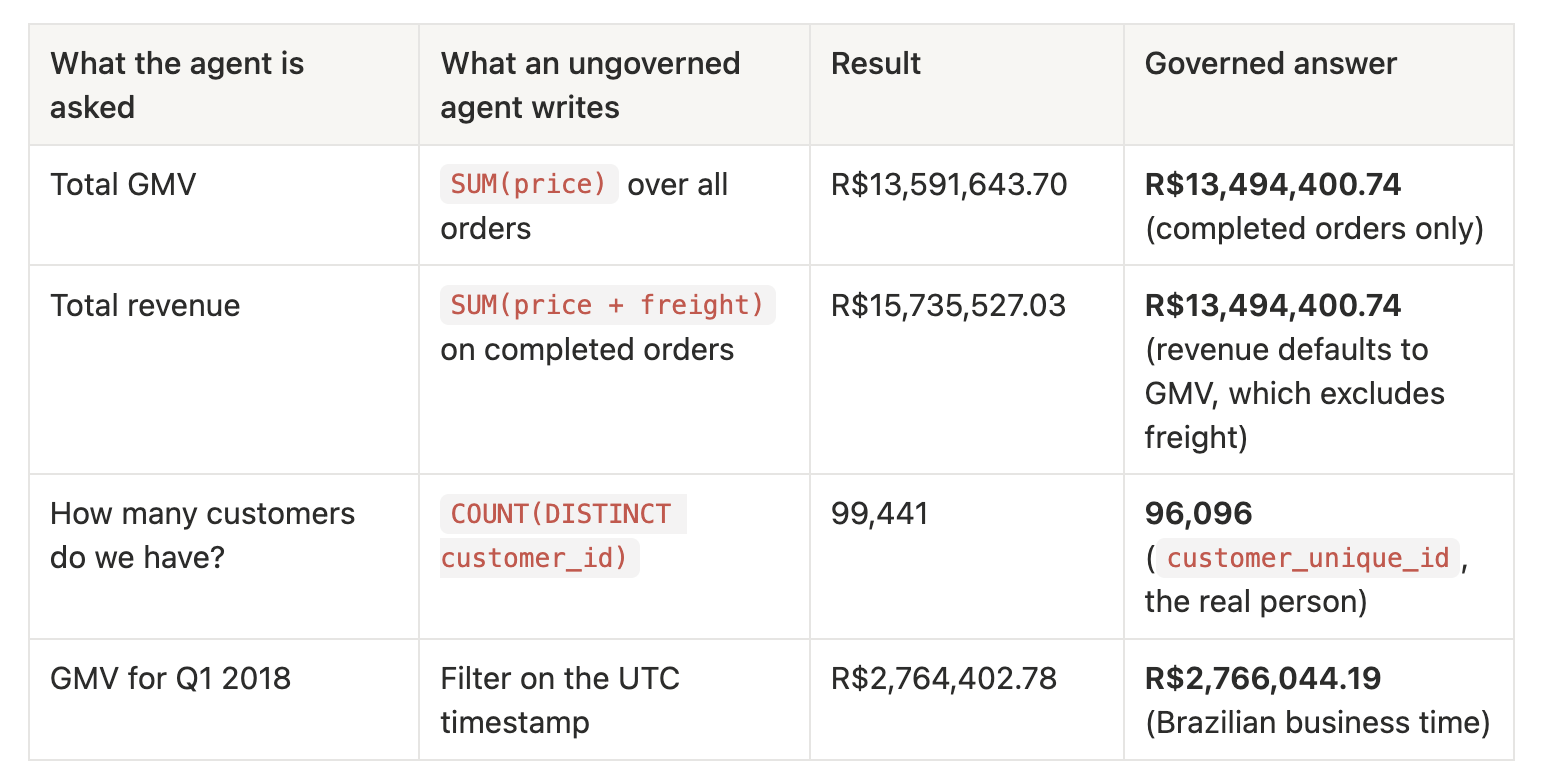
None of these errors is dramatic. Each is off by between 0.06% and 17%, and they could also end up in a board deck.
In cases like this, what's missing is context: which orders count, which identifier represents a person, what "revenue" means at this company, which timezone the business runs on. Your analytics team already has this knowledge, but the agent doesn't.
This playbook shows how to put that context inside your warehouse, versioned and built by dbt, using the dbt Agent Schema pattern. Everything here comes from a working, open-source project you can clone and run locally in minutes: datacult/dbt-agent-trust.
By the end of this playbook, you'll have:
AGENTS schema, rebuilt automatically on every dbt build, that exposes only what you choose.The thesis is simple: governing an agent is a modeling problem, not a prompting problem. You already have the tools to solve it: dbt models, YAML, tests, and version control.
This project started out using the dbt Semantic Layer. I switched to Agent Schema on purpose, and the reasons are worth explaining because your situation may call for a different choice.
First, it's worth being precise about what the Semantic Layer is today:
For this project, those three facts decided it. I wanted an agent anyone could clone and run on a laptop against DuckDB, with no account required.
Agent Schema is just tables in your warehouse. It's a standard AGENTS schema holding your model metadata, column descriptions, and business rules. Any agent with a SQL connection can read it, so there's no extra service in the query path. dbt Labs' official agents-schema CLI populates it on Snowflake, Databricks, and BigQuery. This project implements the same spec as a dbt macro so it also runs on local DuckDB.
The agent writes its own SQL, guided by your definitions. It can therefore answer questions nobody pre-modeled, such as "what share of late deliveries are inter-state shipments in the Northeast?", instead of being limited to a list of defined metrics.
The trade-off. MetricFlow compiles a metric: the same definition produces the same SQL every time. An agent reading Agent Schema generates SQL from your definition. With a precise guide that SQL is highly accurate, but an LLM step is never deterministically guaranteed.
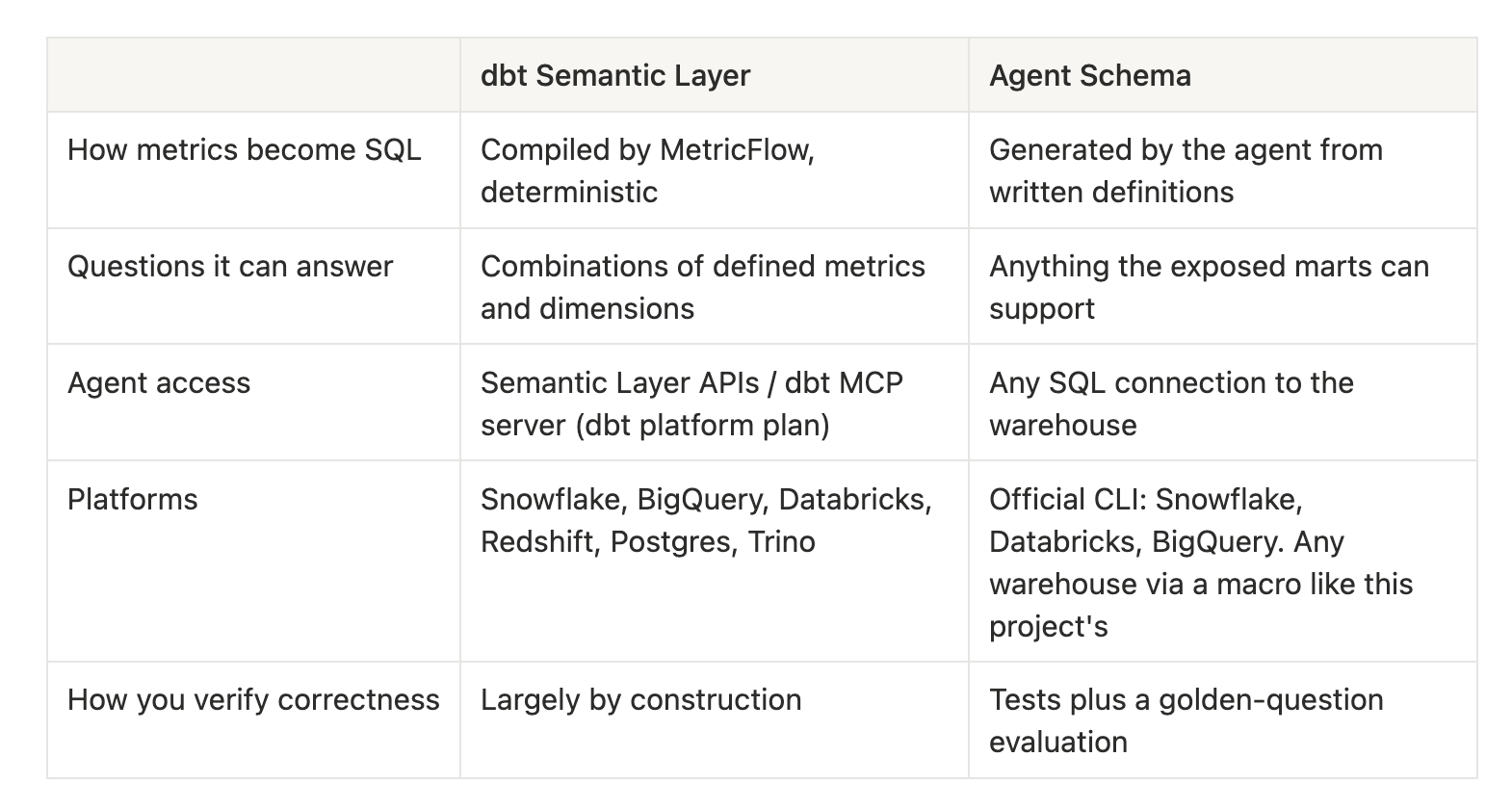
If you need guaranteed metric SQL, for example for finance reporting, and you're on a supported platform with a dbt platform plan, the Semantic Layer is the stronger choice. The two also aren't mutually exclusive, since Agent Schema can hold context about metrics defined elsewhere. If you want a flexible, portable context layer and are willing to measure accuracy rather than assume it, Agent Schema is the better fit. That measurement is what the companion article in this project, Trust by Design, covers.
The Agent Schema is four tables, following the dbt-labs/agents_schema spec:
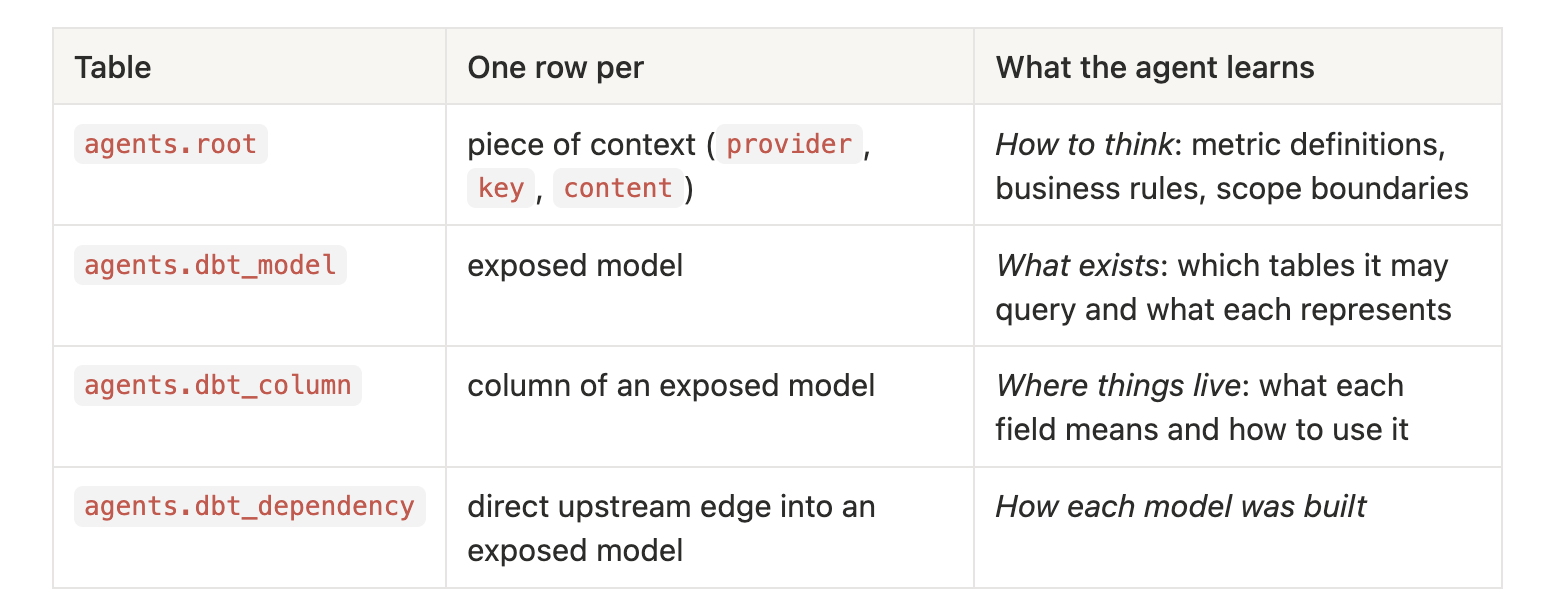
The most important design idea is that context comes in two layers:
agents.dbt_model and agents.dbt_column. "gmv_amount is the item price in BRL" describes one column.If you get this split right, the agent reads root to learn how to reason and reads the catalog to find where to point its query.
Here's how the pieces flow:
dbt marts (fct_*, dim_*)  +  column descriptions (.yml)  +  business_context.md
              │
              ▼   build_agents_schema macro (on-run-end, every dbt build)
        AGENTS schema
        ├─ agents.root            rules, metric definitions, scope boundaries
        ├─ agents.dbt_model       one row per exposed mart
        ├─ agents.dbt_column      one row per column, with descriptions
        └─ agents.dbt_dependency  direct upstream edges into exposed marts
              │
              ▼
   Agent reads root → dbt_model → dbt_column, then queries the marts
An agent can only be as governed as the models it queries. Before thinking about metadata, get the marts right.
models/
├── staging/        clean and rename sources         (views, hidden)
├── intermediate/   apply business rules once        (tables, hidden)
└── marts/ fct_* and dim_* for consumption (tables, exposed)The intermediate layer is where you remove the traps so the agent never meets them. In this project:
- `int_customers__region_assigned` and `int_sellers__region_assigned` map 27 Brazilian states into five macro-regions using a single `brazil_region()` macro.
- `int_products__categorized` translates Portuguese categories to English, fills missing ones with `'uncategorized'`, and rolls them up into executive departments.
- `int_reviews__deduped` fixes a source issue where `review_id` repeats across orders.
- `int_orders__enriched` converts timestamps to São Paulo time and computes the delivery flags.
Each rule is written once, tested, and reviewed like any other code. The agent doesn't need to know that the source category names are Portuguese. It only ever sees the English ones.
Olist questions are asked at four different grains: revenue per order item, delivery per order, satisfaction per review, and payment per payment record. A single wide table would fan out and double-count. Joining payments to items, for example, multiplies payment value by item count.
The project uses four fact tables and four shared dimensions:
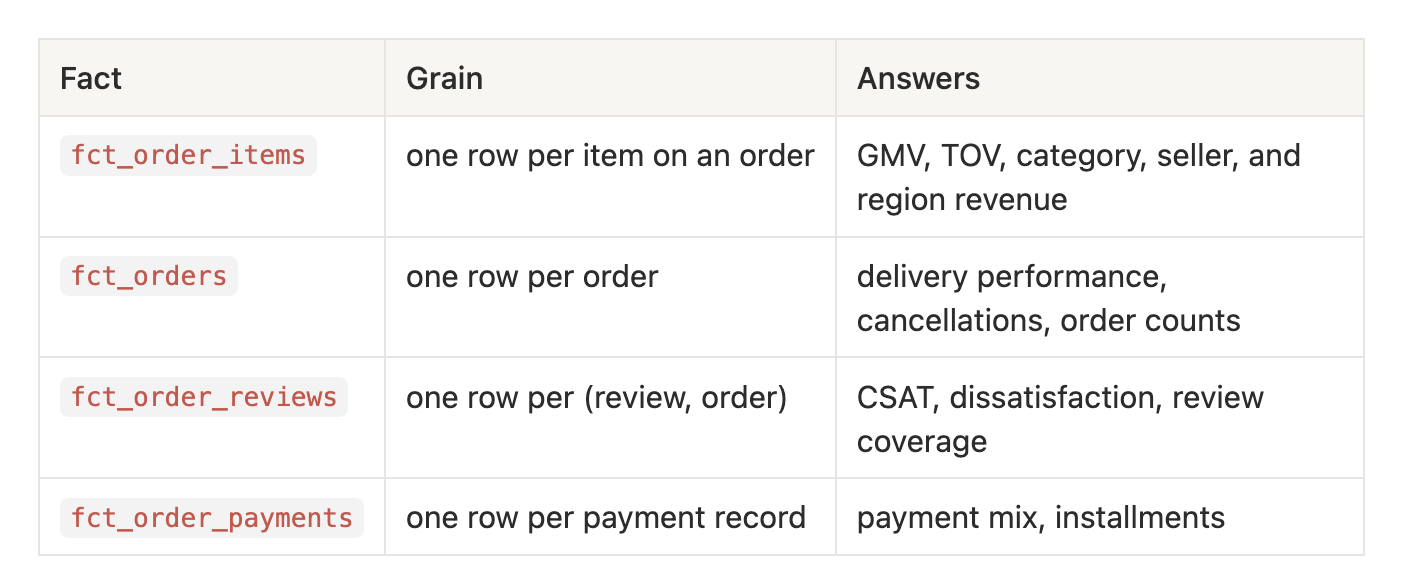
These are joined to dim_customers, dim_sellers, dim_products, and dim_dates. Region is defined once and shared everywhere.
This is the modeling decision that matters most for agents. The marts don't store "GMV". They store the ingredients of GMV with names that point to the metric:
-- models/marts/fct_order_items.sql
select
    order_item_pk,
    order_id,
    customer_unique_id,
    is_completed,
    purchased_at,
    purchased_at_sao_paulo,
    customer_region,
    seller_region,
    is_intra_state,
    product_category_name,
    product_department,
    price            as gmv_amount,
    freight_value    as freight_amount,
    item_total_value as tov_amount
from {{ ref('int_order_items__enriched') }}Because price has been renamed to gmv_amount, the model is unlikely to use it for the wrong metric. is_completed wraps a five-status rule in a single boolean. purchased_at_sao_paulo removes the need for the agent to reason about timezones. Every pre-computed flag is one less decision the agent can get wrong.
A good test: for each metric in your glossary, can the agent write it as a single aggregate plus filters? In this project, GMV is SUM(gmv_amount) WHERE is_completed and CSAT is AVG(is_positive_review). If a metric needs window functions and three CTEs, then maybe you should move that logic into the model.
This is where most dbt projects already have a head start, and most don't use it. Every column description you write becomes a row in agents.dbt_column, and the agent reads that row before it writes SQL. Your YAML documentation is the agent's prompt.
Compare a typical description with a description written for an agent:
Documentation for a human browsing dbt docs
- name: gmv_amount
  description: Item price.

Documentation for an agent writing SQL
- name: gmv_amount
  description: >
    Merchandise value (item price) in BRL. SUM(gmv_amount) WHERE is_completed = GMV.
    Excludes freight and non-completed orders.
The second version gives the unit, the metric the column supports, SQL pattern, and what's excluded. Here is how that context looks when the agent queries it from the built schema:

Three of the four errors from the opening table are prevented by these rows alone.
From writing 95 of them for this project:
customer_unique_id, and "Per-order customer key (one per order, not the person)." on customer_id.dim_dates: "Join on cast(purchased_at as date) = date_day."Model-level descriptions matter just as much, because the agent reads them to choose a table:
fct_order_items: Atomic revenue fact, one row per item on an order. This is the GMV/TOV grain. Filter to is_completed = true for all revenue metrics.
fct_order_payments: One row per payment record. An order can have several (split payments); their sum equals TOV.
Descriptions tell the agent what the data means. Tests make sure the data still matches. In this project:
unique + not_null on every grain key catches fan-out before the agent double-counts.relationships on every foreign key catches broken joins.accepted_values on order_status, payment_type, review_score, regions, and departments, so a description that lists valid values stays accurate.If a description says "one row per order" and a join upstream breaks that, dbt build fails before the AGENTS schema is republished. That's governance working as intended.
Column descriptions cover what each table and field means. The rules that span tables need their own home: a markdown file that the build loads into agents.root. In this project that file is olist_business_context.md, which is about 17,600 characters, or roughly 4,500 tokens.
Write it the way you'd onboard a new analyst on their first day. Here's the structure that worked:
Business Context and Analytical Rules
These are the techniques that pay off most.
Average Order Value (AOV):
AOV = GMV / COUNT(DISTINCT completed order_id)

Not: GMV / count of order items (that would be average item value, a different metric).The "Not:" line actually matters.
Stakeholders don't say "GMV". They say "revenue", "sales", or "how much did we sell". Decide what those words mean:
Default Revenue Metric:
When someone asks about "revenue," "sales," or "how much did we sell," default to GMV.Specify which definition is being used in the response. If they ask "what did customers pay" or "total order value," use TOV.
Without this rule, the second row of the opening table (R$15.7M instead of R$13.5M) is the likely result.
Instalments:
When asked about average installments, filter to credit card payments only. Including boleto (always 1) dilutes the metric and misrepresents actual installment behavior.
When the agent understands why a rule exists, it applies the rule correctly to questions you didn't anticipate.
The context file lists expected magnitudes: total GMV of about R$13.5M, CSAT of about 77.1%, a repeat purchase rate of about 3.1%, and an on-time rate of 91.9%. These give the agent, and anyone reviewing its output, a sanity check. If a query returns a 40% repeat rate, something is wrong. Only include values you've verified against the built marts. I checked these with direct queries while writing this article.
A governed agent needs to know when to say no:
Out of Scope / Data Boundaries:
When a question falls outside these boundaries, decline and explain what data is
missing. Do not guess, estimate, or fabricate a number.
How to respond when out of scope: State clearly that the dataset does not include the
required data, name what's missing, and suggest the closest question the data can answer.
An agent that turns "what's our profit margin?" into a confident number built from freight and price does far more damage than one that says "there's no cost data, but I can show you GMV and freight ratio."
AGENTS schema with a dbt macroNow connect everything. A single macro, build_agents_schema, reads dbt's in-memory project graph and writes the four tables. It runs automatically at the end of every build.
# dbt_project.yml
on-run-end:
  - "{% if flags.WHICH in ['run', 'build'] %}{{ build_agents_schema() }}{% endif %}"

models:
  olist:
    staging:
      +materialized: view
    intermediate:
      +materialized: table
    marts:
      +materialized: table
      +tags: ['agent']      # ← the governance boundary
Two decisions here:
agent tag is your exposure boundary. Only tagged models get published. Staging, intermediate, and raw seeds stay invisible to the agent. To expose a new model, you tag it in a pull request that gets reviewed.flags.WHICH guard means dbt test or dbt compile won't rebuild the schema. It only rebuilds when models have actually been built.The full macro is in macros/build_agents_schema.sql. It runs in five stages.
1. Create the tables (the DDL follows the spec and is adapted for DuckDB types):
{% do run_query('create schema if not exists agents') %}
{% do run_query('create or replace table agents.root (provider varchar not null, key varchar not null, content text not null, primary key (provider, key))') %}
{% do run_query('create or replace table agents.dbt_model (unique_id varchar not null, name varchar not null, database_name varchar, schema_name varchar, materialization varchar, description text, file_path varchar, tags json, meta text, primary key (unique_id))') %}
{# ...dbt_column and dbt_dependency follow the same pattern #}create or replace means every build produces a fresh, complete snapshot. Nothing goes stale and nothing needs to be migrated.
2. Select the exposed set from the graph:
{% for node in graph.nodes.values() if node.resource_type == 'model' and 'agent' in node.tags %}
  {% do exposed.append(node.unique_id) %}
{% endfor %}3. Read metadata for exposed models only: name, schema, materialization, description, tags, and meta for each model; name, type, and description for each column; and every direct upstream edge from depends_on.nodes, as the spec defines it.
4. Insert the rows, then backfill column types from the warehouse. The spec reads data_type from your YAML, and most projects don't declare it. Since the marts have just been built, the macro fills any blank types from information_schema. Types declared in YAML still take precedence.
{% do run_query("
  update agents.dbt_column as c
  set data_type = i.data_type
  from agents.dbt_model as m, information_schema.columns as i
  where c.model_id = m.unique_id
    and i.table_catalog = m.database_name
    and i.table_schema  = m.schema_name
    and i.table_name    = m.name
    and i.column_name   = c.column_name
    and coalesce(c.data_type, '') = ''
") %}
5. Populate root, first with short pointer rows that explain the catalog, then with your context files:
{% set context_files = [
    ('olist', 'business_context', 'olist_business_context.md')
] %}
{% for prov, k, path in context_files %}
  {% do run_query("insert into agents.root select '" ~ prov ~ "', '" ~ k ~ "', content from read_text('" ~ path ~ "')") %}
{% endfor %}
DuckDB's read_text loads the markdown file directly into a row. On Snowflake or BigQuery you'd load the file contents in Jinja or stage the file, but the pattern is the same.
The macro logs a summary when it finishes:
AGENTS built (marts only): 8 models, 95 columns, 9 deps, 1 context file(s).One deliberate difference from the spec: the spec publishes every model, while this macro publishes only models tagged agent. For a governed agent, what you leave out matters as much as what you include.
AGENTS tablesThe tables are regenerated from source on every build. To change what the agent knows, edit the .yml or the .md file, open a pull request, and run dbt build. Your agent's context goes through the same review, CI, and history as your models.
Because the context layer is made of plain tables, you can audit it with plain SQL. Before connecting an agent, look at what it will see. Here's the output from this project.
root?select provider, key, length(content) as chars
from agents.root
order by provider, key;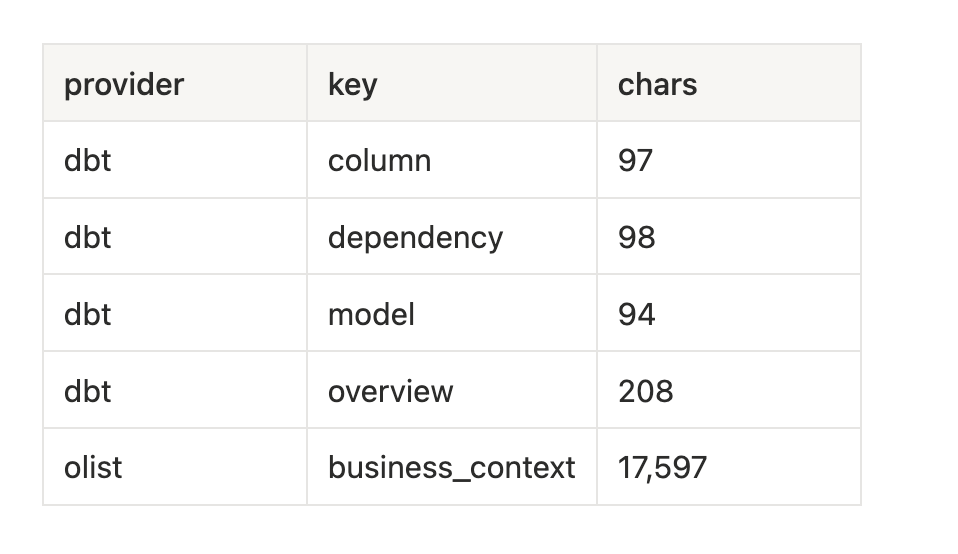
Four short dbt rows describe the catalog, for example: "Only these marts are exposed; staging and intermediate models are intentionally hidden." One large row holds the business rules. That works well for a single domain. The section on scaling below covers when to split it.
select
  m.name,
  count(c.column_name)                                             as columns,
  count(*) filter (where coalesce(c.description, '') = '')         as undocumented
from agents.dbt_model m
left join agents.dbt_column c on c.model_id = m.unique_id
group by m.name
order by m.name;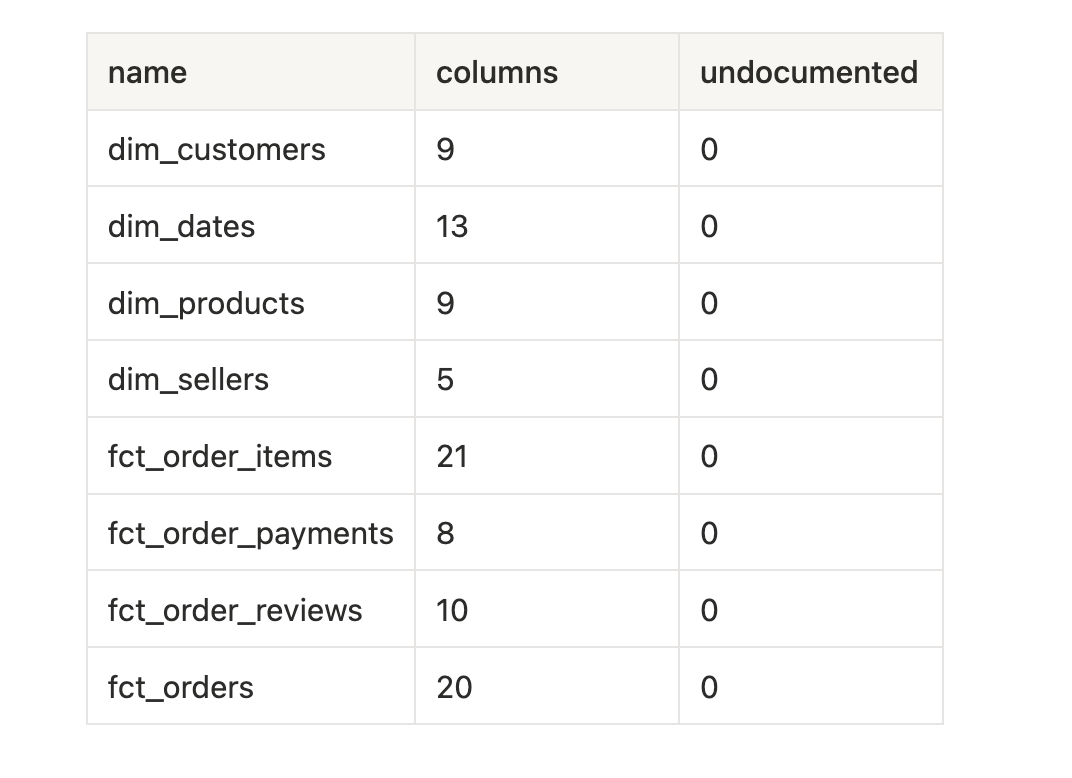
Out of 30 relations in the warehouse, 8 are exposed, and all 95 of their columns are documented. The other 22 (raw seeds, staging views, and intermediate tables) don't appear in the catalog at all.
That coverage query is worth adding to CI. An undocumented column in an exposed model is a column the agent has to guess about.
select column_name, data_type
from agents.dbt_column
where model_id = 'model.olist.fct_order_items'
  and column_name in ('customer_unique_id', 'gmv_amount', 'is_completed', 'purchased_at_sao_paulo');

select split_part(upstream_id, '.', 3) as built_from, split_part(downstream_id, '.', 3) as mart
from agents.dbt_dependency
order by mart;
Every column now carries its warehouse type, so the agent knows gmv_amount is numeric and is_completed is a boolean without having to probe the table. The dependency table shows how each mart was built. For example, fct_order_reviews comes from int_reviews__deduped, which tells the agent that reviews have already been deduplicated. fct_order_payments draws on both stg_olist__order_payments and int_orders__enriched.
Those upstream models appear only as names. They aren't in dbt_model or dbt_column, and the agent isn't allowed to query them. Lineage explains how a mart was built without giving access to its inputs.
This inspection step is one of the best reasons to use Agent Schema. There's no hidden runtime and no prompt assembled somewhere you can't see. What the agent can know is exactly what these queries return.
A context layer is only useful if the agent reads it every time. That comes down to two things: an instruction that defines a discovery process, and a boundary taken from the Agent Schema itself.
The system prompt doesn't include the schema or the business rules. It tells the agent how to find them at runtime:
The schema and business rules are NOT inlined here. Discover them at runtime
through the agents.* metadata catalog, walking this chain in order:
business_context holds the metric definitions, filters, timezone rules, and the in-scope reporting window; read it fully and follow it exactly rather thanagents.dbt_model to see the exposed marts and their descriptions, then choose the correct grain for the question.agents.dbt_column. Prefer the documented helper columns (pre-computed flags and localized timestamps) over recomputing that logic yourself.agents.Base every answer on a query you actually ran; never invent SQL or numbers. If thequestion is out of scope per the business context, decline and briefly explain why.
This approach means the prompt never goes out of date. Merge a pull request that redefines active sellers, run dbt build, and the agent follows the new definition on its next question without a prompt change or a deploy.
Here's the discovery chain for "What was GMV in Q1 2018?":
agents.root → GMV = SUM(price) on completed orders, excluding freight. Use São Paulo time for period aggregations.agents.dbt_model → *fct_order_items is "the GMV/TOV grain. Filter to is_completed = true."*agents.dbt_column → *gmv_amount: "SUM(gmv_amount) WHERE is_completed = GMV"; purchased_at_sao_paulo: "Use for day/week/hour analysis."*select round(sum(gmv_amount), 2) as gmv
from main.fct_order_items
where is_completed
and purchased_at_sao_paulo >= '2018-01-01'
and purchased_at_sao_paulo < '2018-04-01';
-- 2766044.19Every clause in that query comes from a row in the AGENTS schema.
For "What's our profit margin?", the chain ends at step 1: root states there is no cost data, so the agent declines and offers GMV or freight ratio instead.
Instructions guide the agent, but a boundary should be enforced, not just requested. The simplest robust approach is to build the agent's query allowlist from agents.dbt_model. The project's agent layer does this: any query touching a relation outside the exposed marts and the agents.* catalog is rejected before it runs.
That makes the agent tag in dbt_project.yml a single line that controls both what the agent knows about and what it's allowed to touch. The agent side of this, including how queries are validated and how runs are captured for evaluation, is covered in Joseph Ojo's companion article.
The Olist project is a single domain. Here's how the same design extends to a real company.
root as a router across domainsTag models by domain with meta. The macro already writes meta into agents.dbt_model:
models:
  my_project:
    marketing: { +tags: ['agent'], +meta: {domain: marketing} }
    finance:   { +tags: ['agent'], +meta: {domain: finance} }
    product:   { +tags: ['agent'], +meta: {domain: product} }
Then give each domain its own context file and its own root row:
{% set context_files = [
    ('company',   'overview', 'company_overview.md'),
    ('marketing', 'context',  'marketing_context.md'),
    ('finance',   'context',  'finance_context.md'),
    ('product',   'context',  'product_context.md')
] %}
The discovery chain becomes: read the company overview → match the question to a domain → read that domain's rules → list that domain's models.
select name, description
from agents.dbt_model
where json_extract_string(meta, '$.domain') = 'marketing';Each domain team owns its context file and its exposed models. Cross-domain rules, such as the fiscal calendar or the definition of an active customer, go in the shared overview.
The Olist context row is about 4,500 tokens, which is fine to read in full. Twenty domains at that size is not. As you grow:
finance/revenue_definitions, finance/scope) so the agent can select only what it needs.dbt_model by domain" instead of "list all models". The schema supports selective reads, but only the prompt makes the agent use them.where model_id = ... or where description ilike '%CAC%' returns a handful of rows instead of the whole catalog.Running on-run-end on every build suits most teams, because context always matches the models it describes. If your builds run hourly and the context changes weekly, move the macro into a separate job or a dbt run-operation build_agents_schema step on your own schedule.
Since the context is plain SQL, you get auditability for free. The AGENTS tables show everything the agent could read, and your MCP tool-call logs show exactly what it did read on each turn. The project's agent records every executed query in its output, so if an answer is wrong you can see which rows it consulted and which it skipped.
+tags: ['agent'], and nothing else.unique, not_null, relationships, and accepted_values.build_agents_schema and the on-run-end hook.dbt build and inspect the result. Check description coverage, exposed models, and root contents.agents.dbt_model.stg_orders and skip your business rules.root, or cross-table rules on columns. Keep the two layers separate.agents.*. Your fix disappears on the next build.This pattern doesn't give you certainty.
That's why the context layer is only half the job. The other half is knowing whether the agent's answers are right before stakeholders see them. In this project we test the agent against 40 curated golden questions, comparing results rather than SQL text. That's the subject of the companion article, Trust by Design, by Opeyemi Fabiyi.
One teaches how to build it. The other teaches how to know it works.
dbt deps && dbt seed && dbt build in dbt_project/.Built by Data Culture as part of the inaugural dbt Champions cohort. Connect with David on LinkedIn and YouTube.
