



If you have pointed an LLM at a data warehouse and asked something like "what was revenue last quarter?", you already know that you will get a number back, quickly and confidently. But if that number is correct and accurate is another ballgame altogether.
As many people will agree with me today, the models rarely have a problem when it comes to writing SQL. The problem is usually having enough business data context to write SQL that will provide accurate responses. The knowledge that makes a number correct usually does not live in the tables at all. It lives in questions like these:
A human analyst can pick this up over time during onboarding, from colleagues, slack threads, or even old dashboards. For an agent, however, this context has to be written somewhere the agent can read at the moment it generates a query. This job has always been the job of a semantic layer and has grown in recent times as an important part of the modern data infrastructure.
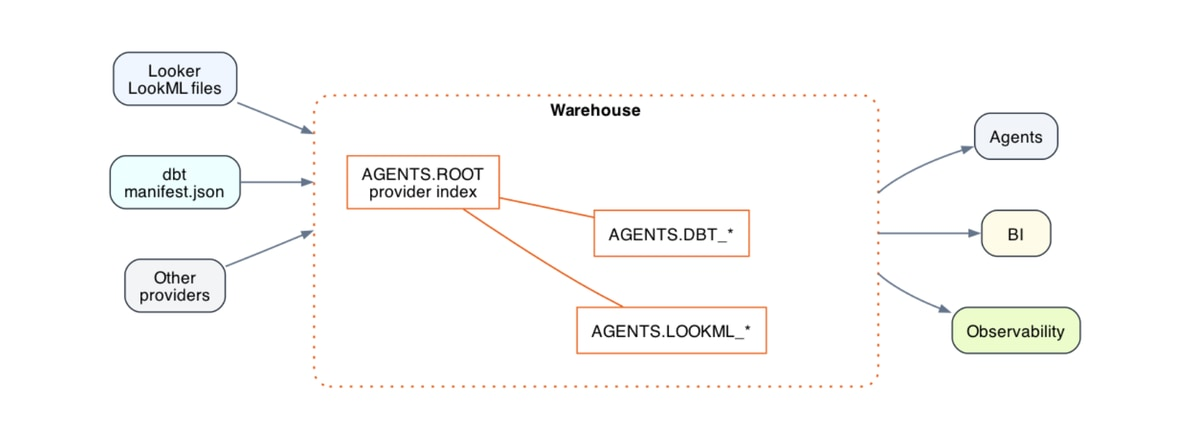
This is the gap the Agents Schema was designed to fill. Fivetran + dbt Labs introduced it as an open standard shortly after the two companies completed their merger. As Fivetran describes it, metric definitions, semantic models, lineage, and business documentation all live in plain SQL tables in one designated schema that any SQL-capable agent can query before it acts. Throughout this post, I will call it the Agent Schema, as we did in our project.
At its simplest, the Agent Schema is a standard set of tables, agents.*, that sits in your warehouse right next to your models. The dbt-labs/agents_schema spec defines what goes in them. Together, they tell an agent three things: what it can query, what each column means, and which business rules apply.
For a dbt project, four tables do most of the work:
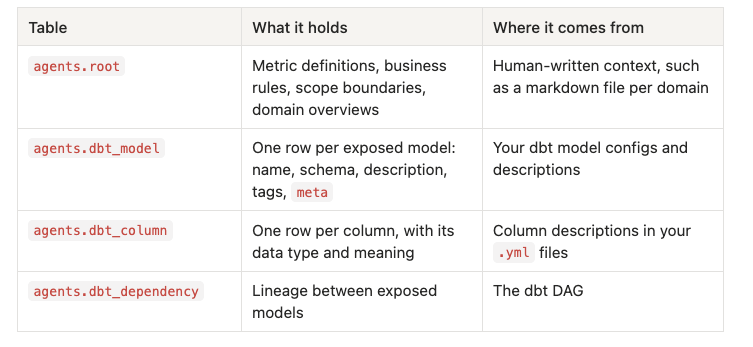
The way I think about it, these tables split context into two layers. agents.root holds the context that is not tied to any one table: how a metric is defined, what gets excluded everywhere, what is out of scope. It tells the agent how to think. agents.dbt_model and agents.dbt_column hold context tied to a specific table or field. They tell the agent where things are.
What I like most is how little machinery is involved. There is no service to run and no runtime to maintain. It is data about your data, stored as rows the agent can simply select. Agent schema doesn’t just support only dbt sources, dbt Agent Schema as at the time of this writing supports other context providers dbt, Looker, OSI, Sigma.
Essentially, the idea of Agent Schema is to take valuable documentation, context & metadata that already exists in other systems you use, like dbt & Looker and materialise it in a dedicated Schema to be accessed by Agents before generating queries. Remember that your agent is only as good as the context it has.
So what does that give an agent, in practice? Six things, in my view:
agents.root, and every agent reads the same definition. If you add the SQL pattern under each definition, the agent fills in filters instead of inventing a query.select * from agents.root and see exactly what the agent knows.root acts as a small router, and models carry a domain in meta, so the agent reads only the slice of the catalog a question needs.My colleague Joseph Ojo recently wrote about Cube as a semantic layer for analytics agents. He ended on what I think is the right question. It is not whether a semantic layer is capable, but "whether the independence it gives you is worth the extra layer."
The Agent Schema is one answer to that question, because it is not really an extra layer. It is a set of tables generated from the project you already maintain, whether that is dbt or another supported provider, and rebuilt on every build or CI run. There is nothing separate to keep in sync.
The dbt Semantic Layer, powered by MetricFlow, is the other dbt-native option, and it makes the opposite core choice. The Semantic Layer compiles a metric: give it the same definition and you get the same SQL every time. With the Agent Schema, the agent generates SQL from a written definition. That is more flexible, but it is an LLM step, so it is not guaranteed in the same way. And this calls for a good context layer and evaluation.
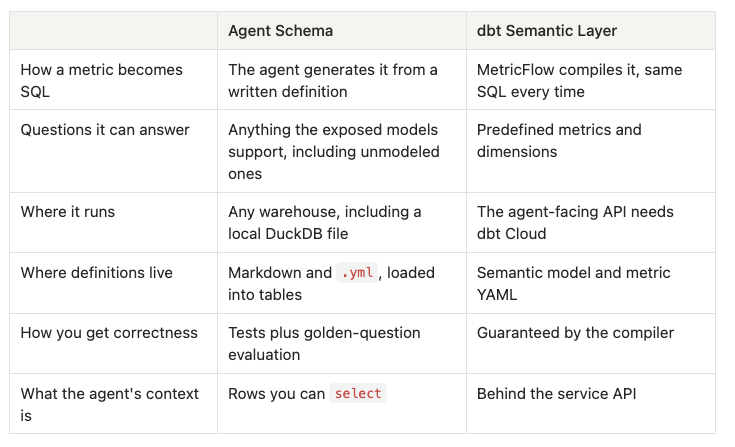
If you want flexibility, portability or no Cloud dependency, and you are willing to evaluate continuously, the Agent Schema is a good fit. If a number has to compile identically every single time, the Semantic Layer is. And as the next section shows, you do not always have to choose.
A fair question at this point is: "We already have the dbt Semantic Layer. Do we need this too?" The short answer is that the two are not competing for the same job, so yes, you can use both, and they fit together quite naturally. This is how I think they can both fit together if you already have a dbt Semantic Layer in place.
The Semantic Layer is very good at a specific job: returning governed metrics exactly the same way every time. What it does not try to do is describe everything around those metrics, such as the models that are not part of a semantic model, the business rules that span them, and the questions your data simply cannot answer. That wider context is what the Agent Schema holds.
Here is how I would combine them:
agents.root as the router between the two. Add a rule like: "For the metrics listed here, query the dbt Semantic Layer. For anything else, use the exposed models." An agent with both the dbt MCP server's Semantic Layer tools and warehouse access can then pick the right path per question.The result is that the Semantic Layer gives you guaranteed numbers where they matter most, and the Agent Schema gives the agent enough context to handle everything else, and to know which is which.
Before getting into dbt specifically, it is worth stating again that dbt is only one possible provider. The spec can also build the Agent Schema from Looker, Omni, OSI (Open Semantic Interchange) and Sigma definitions, as well as markdown files. The official route is a set of open-source GitHub Actions workflows: a workflow in your repository runs the agents-schema CLI, which writes the metadata into an AGENTS schema in Snowflake, Databricks, BigQuery or ClickHouse. If you are on one of those, start with the spec.
In our dbt Agent Trust project, we wanted something anyone could run on a laptop, so we built the schema with a dbt macro on local DuckDB instead. Whichever route you take, the steps are the same four.
+tags: ['agent']. Anything you do not tag stays invisible to the agent..yml descriptions become agents.dbt_column, so write them as instructions rather than labels. Say how a field is used in a metric, not just what it is.agents.*, and loads the markdown into agents.root.One habit worth building early: treat the agents.* tables as generated output. When something needs to change, edit the .yml or the markdown and rebuild, rather than editing the tables by hand.
Once the schema exists, connecting an agent is the easy part. Give the agent access to your warehouse through an MCP server, and make that connection read-only. The agent can then read the context and query your models, but it can never change anything.
The interesting design choice is what goes in the agent's instructions. It is tempting to paste your whole schema and every business rule into the system prompt. We did the opposite.
agents.root for the rules, definitions and scope.agents.dbt_model to choose the right model and grain for the question.agents.dbt_column for the models you plan to query.When it all works, you can see the difference straight away. Ask an in-scope question and the agent answers from your definitions instead of its own guesses. Ask for something like profit margin when there is no cost data, and it tells you plainly that it cannot answer, and why.
is_completed, or a timestamp already converted to the business timezone, carries a rule the agent never has to apply, which means it cannot apply it wrongly.agents.root. What a field means belongs in agents.dbt_column. When the two get mixed, both become harder to maintain.If there is one idea I would like you to take away, it is that an AI semantic layer does not have to be a brand-new tool. With the Agent Schema, it is largely the dbt work you already do, written for a new kind of reader: tagged models, precise column descriptions, and a context file that says what you mean and what your data cannot tell you.
If you want to try it, here is where I would start:
agents.* with the spec's GitHub Action for your warehouse, or with a dbt macro like ours.Our open-source reference implementation, dbt Agent Trust, was built at Data Culture by Opeyemi Fabiyi, Joseph Ojo and me, as part of the inaugural dbt Champions cohort. It runs locally on DuckDB, so you can clone it and have an agent answering questions in a few minutes.
